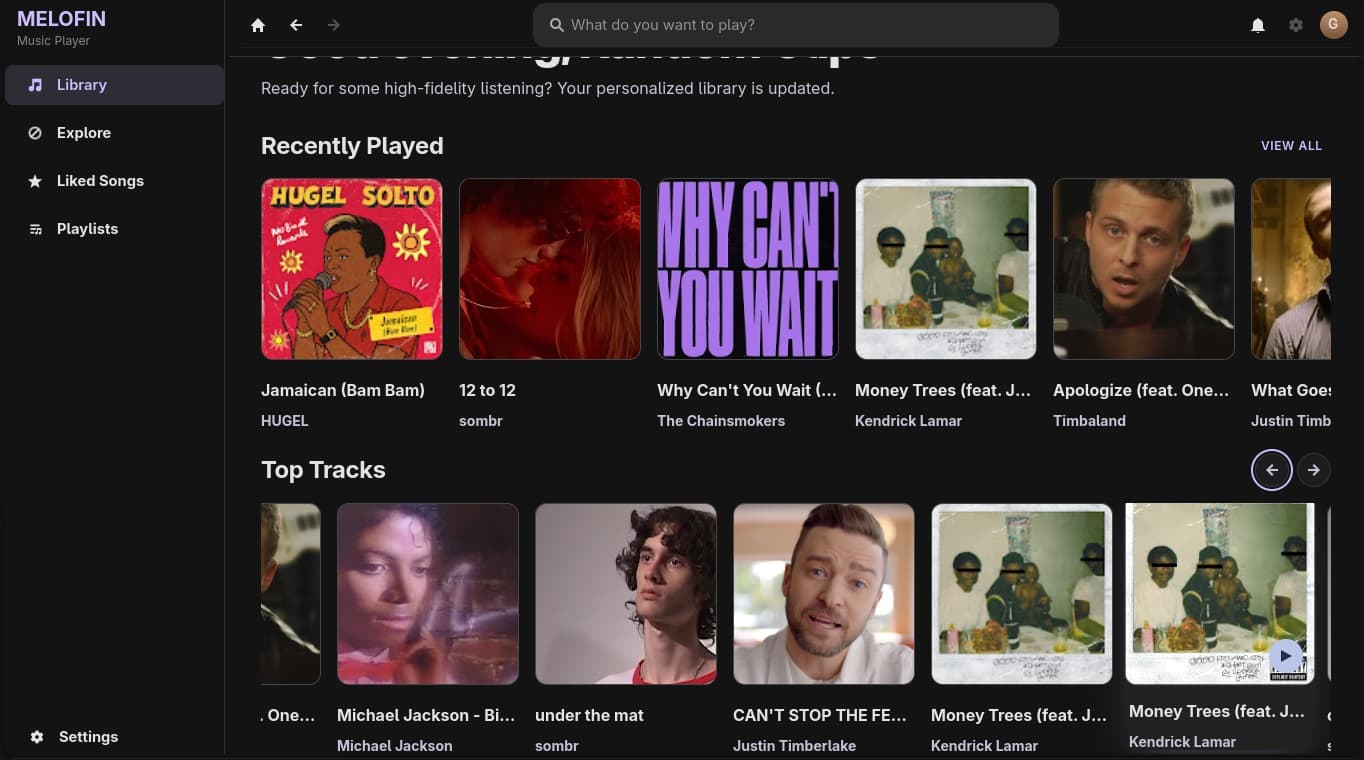
The Problem with Electron Music Players
I use YouTube Music as my primary music service on Linux. The official web player works, but it's a Chrome tab — no system media controls, no tray integration, no gapless playback. There are Electron-based clients like youtube-music, but they spawn a full Chromium process for what's essentially a media player. On a laptop with 8GB of RAM, that's unacceptable.
I wanted something native. Something that uses the system's audio stack, responds to media keys, and doesn't eat 500MB of RAM. So I built Melofin — a native Linux YouTube Music client in Rust with GTK4.
Architecture: Two Threads, One Channel
The biggest architectural decision was separating the player from the UI. In most music players, playback and UI are tightly coupled — if the UI freezes during a network request, the music stutters. I wanted the player to be completely independent.
The solution: run mpv in a separate thread and communicate with it via JSON IPC. The UI thread sends commands (play, pause, seek) and the player thread executes them. If the UI freezes, the music keeps playing.
┌──────────────┐     async channels     ┌──────────────┐
│   GTK4 UI    │ ◄──────────────────► │  mpv Player  │
│   (main)     │                        │  (tokio)     │
└──────────────┘                        └──────────────┘
I used tokio's async channels to bridge the two threads. The player runs in a LocalSet (required because mpv's IPC uses non-Send types), and the UI communicates through mpsc channels:
use tokio::sync::mpsc;

enum PlayerCommand {
    Play(String),
    Pause,
    Seek(f64),
    SetVolume(f64),
    GetPosition,
}

enum PlayerEvent {
    PositionUpdate(f64),
    PlaybackEnded,
    Error(String),
}

// In the player thread
let (cmd_tx, mut cmd_rx) = mpsc::channel::<PlayerCommand>(32);
let (evt_tx, evt_rx) = mpsc::channel::<PlayerEvent>(32);

tokio::task::spawn_local(async move {
    let mut mpv = MpvController::new().await?;
    while let Some(cmd) = cmd_rx.recv().await {
        match cmd {
            PlayerCommand::Play(url) => mpv.load(&url).await?,
            PlayerCommand::Pause => mpv.set_property("pause", true).await?,
            PlayerCommand::Seek(pos) => mpv.seek(pos).await?,
            PlayerCommand::GetPosition => {
                let pos = mpv.get_property("time-pos").await?;
                evt_tx.send(PlayerEvent::PositionUpdate(pos)).await?;
            }
            _ => {}
        }
    }
    Ok::<_, Box<dyn std::error::Error>>(())
});
The key insight was using mpsc::channel with a small buffer (32). Commands are fire-and-forget for most operations — you don't need to wait for "pause" to complete before sending "seek." The only command that needs a response is GetPosition, which sends back through the event channel.
Controlling mpv via JSON IPC
mpv exposes a JSON IPC protocol over a Unix socket. You send a command as JSON, and it responds with a JSON object containing the result or error. The protocol is documented but the documentation is sparse — I learned most of it from reading mpv's source code.
Here's the core of my mpv controller:
use tokio::net::UnixStream;
use serde_json::{json, Value};

struct MpvController {
    socket: UnixStream,
    request_id: u32,
}

impl MpvController {
    async fn new() -> Result<Self> {
        let socket_path = std::env::temp_dir().join("melofin-mpv.sock");
        let socket = UnixStream::connect(&socket_path).await?;
        Ok(Self { socket, request_id: 0 })
    }

    async fn command(&mut self, args: Vec<Value>) -> Result<Value> {
        self.request_id += 1;
        let msg = json!({
            "command": args,
            "request_id": self.request_id,
        });

        let mut buf = serde_json::to_vec(&msg)?;
        buf.push(b'\n');
        self.socket.write_all(&buf).await?;

        // Read response
        let mut response_buf = vec![0u8; 4096];
        let n = self.socket.read(&mut response_buf).await?;
        let response: Value = serde_json::from_slice(&response_buf[..n])?;
        Ok(response["data"].clone())
    }

    async fn load(&mut self, url: &str) -> Result<()> {
        self.command(vec!["loadfile".into(), url.into()]).await?;
        Ok(())
    }

    async fn seek(&mut self, seconds: f64) -> Result<()> {
        self.command(vec![
            "seek".into(),
            json!(seconds),
            "absolute".into(),
        ]).await?;
        Ok(())
    }

    async fn set_property(&mut self, name: &str, value: Value) -> Result<()> {
        self.command(vec!["set_property".into(), name.into(), value]).await?;
        Ok(())
    }
}
The tricky part is that mpv sends responses as newline-delimited JSON. You might read a partial response, or multiple responses in one read. I solved this by reading into a buffer and splitting on newlines — but only after I'd already debugged three "JSON parse error" panics in production.
MPRIS: Making Media Keys Work
Linux desktop environments use MPRIS (Media Player Remote Interfacing Specification) to control media players. When you press the play/pause key on your keyboard, the desktop environment sends an MPRIS command to the active player. If your app doesn't implement MPRIS, the keys do nothing.
MPRIS is a D-Bus interface. You implement a set of properties and methods, and the desktop environment does the rest. The core properties are PlaybackStatus, Metadata (title, artist, album art URL), and the methods are Play, Pause, Stop, Next, Previous.
use zbus::interface;

#[interface(name = "org.mpris.MediaPlayer2.Player")]
impl MprisPlayer {
    #[zbus(property)]
    fn playback_status(&self) -> &str {
        match self.status {
            PlaybackStatus::Playing => "Playing",
            PlaybackStatus::Paused => "Paused",
            PlaybackStatus::Stopped => "Stopped",
        }
    }

    #[zbus(property)]
    fn metadata(&self) -> HashMap<&str, zbus::zvariant::Value> {
        let mut meta = HashMap::new();
        meta.insert("xesam:title", Value::from(self.title.clone()));
        meta.insert("xesam:artist", Value::from(self.artist.clone()));
        if let Some(art_url) = &self.art_url {
            meta.insert("mpris:artUrl", Value::from(art_url.clone()));
        }
        meta
    }

    #[zbus(method)]
    async fn play(&self) {
        self.cmd_tx.send(PlayerCommand::Play).await.ok();
    }

    #[zbus(method)]
    async fn pause(&self) {
        self.cmd_tx.send(PlayerCommand::Pause).await.ok();
    }
}
The zbus crate makes D-Bus integration surprisingly pleasant. You annotate methods with #[interface] and #[zbus(method)], and it handles the D-Bus protocol, serialization, and service registration automatically.
Once MPRIS was working, the GNOME media overlay appeared automatically — album art, track name, artist, and play/pause/skip buttons in the system tray. It felt like magic after writing raw D-Bus XML by hand (my first attempt before discovering zbus).
Reverse-Engineering InnerTube
YouTube doesn't have a public API for music search and playback. The official API requires OAuth and has strict quotas. For a desktop client, I needed something lighter.
YouTube's web player uses an internal API called InnerTube. It's undocumented, but the community has reverse-engineered enough of it to build clients. The basic flow is:
- Send a POST request to
https://music.youtube.com/youtubei/v1/searchwith a JSON body containing the search query and a client identifier - Parse the response — it returns video IDs, titles, thumbnails, and duration
- Use yt-dlp to extract the actual audio stream URL from the video ID
use reqwest::Client;

async fn search_songs(query: &str) -> Result<Vec<Song>> {
    let client = Client::new();
    let body = json!({
        "context": {
            "client": {
                "clientName": "WEB_REMIX",
                "clientVersion": "1.20231121.00.00",
                "hl": "en",
                "gl": "US",
            }
        },
        "query": query,
    });

    let resp = client
        .post("https://music.youtube.com/youtubei/v1/search")
        .json(&body)
        .send()
        .await?;

    let data: Value = resp.json().await?;
    // Parse results from data["contents"]["twoColumnSearchResultsRenderer"]...
    // (parsing logic here)
}
The hardest part was authentication. YouTube requires cookies from a logged-in browser session to access personalized content (liked songs, home feed). I used the rookie crate to automatically import cookies from Firefox:
use rookie::firefox;

fn get_youtube_cookies() -> Result<Vec<Cookie>> {
    let cookies = firefox(vec![
        "youtube.com",
        "music.youtube.com",
    ])?;
    Ok(cookies)
}
This reads the cookie database directly from Firefox's profile directory. No manual cookie copying, no OAuth flow — it just works as long as you're logged into YouTube in Firefox.
The InnerTube API changes without notice. I learned this the hard way when a version bump broke authentication overnight. Now I pin the clientVersion string and update it manually when things stop working. It's fragile, but there's no alternative for a native client.
What Surprised Me
The biggest surprise was how much of the work was plumbing, not algorithms. Connecting mpv to GTK4, bridging async runtimes, importing browser cookies, implementing D-Bus interfaces — none of this is "hard" in the algorithmic sense. It's all integration work, and it took 80% of the development time.
The actual "smart" parts — the search algorithm, the playback logic, the UI layout — were straightforward. The difficulty was in making all these systems talk to each other reliably.
Rust was the right choice for this project. The ownership model caught three data races at compile time that would have been nightmarish to debug in C or Python. And GTK4's performance with Rust is noticeably better than with Python bindings — the UI stays responsive even while buffering audio over a slow connection.
If you're thinking about building a desktop Linux app, Rust + GTK4 + mpv is a combination that works. It's not the easiest path, but the result is a native app that feels like it belongs on the system.